




Image: Foundry
Most monitors sit on a desk and don’t move any more than their stand or arm allows. We have a separate round up of the best monitors for Mac.
But sometimes a more portable solution makes sense when the MacBook’s own screen simply isn’t large enough. There are two main types of portable display: travel monitors that can be slipped into a backpack; or moveable monitors that can be carried from one room to another or quickly hidden from sight when not in use.
|
Plugable 15.6-inch USB-C Portable Display: Lightweight portable USB-C 15.6-inch HD screen |
View Deal | |
|
Show Pros & Cons Pros
Cons
Hide Pros & Cons |
|||
|
Mobile Pixels Duex Float 2 Pro: Portable USB-C 16-inch QHD screen that stacks |
Check on Amazon | |
|
Show Pros & Cons Pros
Cons
Hide Pros & Cons |
|||
|
Asus ZenScreen MB249C: Large but portable 24-inch HD screen |
View Deal | |
|
Show Pros & Cons Pros
Cons
Hide Pros & Cons |
|||
|
UPerfect Delta Max & Delta Mega: Stacked dual-screen monitors |
Check on Amazon | |
|
Show Pros & Cons Pros
Cons
Hide Pros & Cons |
|||
|
MSI Pro MP165 E6 Portable Monitor: Budget portable monitor |
Check on Amazon | |
|
Show Pros & Cons Pros
Cons
Hide Pros & Cons |
|||
|
Mobile Pixels Trio 3 Pro: Screen extender for portability |
View Deal | |
|
Show Pros & Cons Pros
Cons
Hide Pros & Cons |
|||
|
Arovia Splay: Ultra-portable, foldable monitor and projector |
View Deal | |
|
Show Pros & Cons Pros
Cons
Hide Pros & Cons |
|||
Here are our picks for the best portable displays to match with your Mac.
Plugable 15.6-inch USB-C Portable Display: Lightweight portable USB-C 15.6-inch HD screen
Pros
- Full HD (1920×1080 at 60Hz) IPS display
- Lightweight
- Integrated folding travel cover and stand
- 85W pass-through charging
- 2x downstream 10Gbps USB-C ports
Cons
- Not much larger than a laptop screen
Price When Reviewed:
$239.95
- Size: 15.6-inch
- Resolution: 2K (1920×1080 pixels) aka HD
- sRGB Color Gamut: 45%
- Brightness: Up to 300 nits
- Connections: 3x USB-C
- Webcam: No
- Stand: Foldable
- Weight: 1.85lb (840g)
- Orientation: Landscape
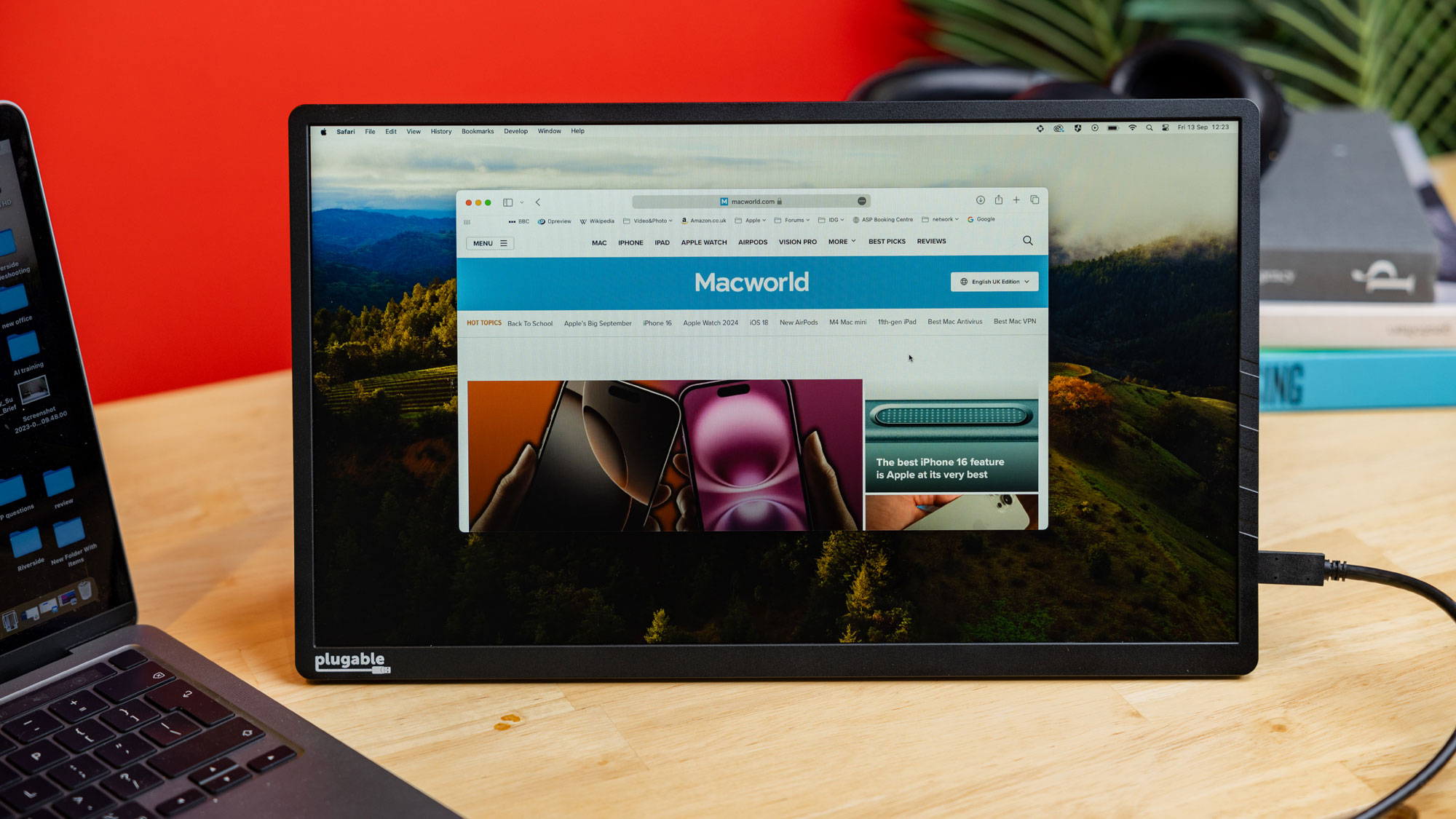
This 15.6-inch Full HD IPS display doubles most laptops’ screen space and is simple to setup and connect, and then disconnect and lightweight enough to carry away when you’re done.
Weighing just 1.85lb (840g) with its cover/stand or 1.35lb (615g) without, it is barely noticeable alongside your laptop in your backpack or briefcase
On the back of the display is a detachable PU vinyl cover that can protect the screen in transit or storage and doubles up as a foldable stand that is easy to setup.–Simon Jary
Read our full
Plugable 15.6-inch USB-C Portable Display review
Mobile Pixels Duex Float 2 Pro: Portable USB-C 16-inch QHD screen that stacks
Pros
- QHD (2560×1600 pixels at 120Hz) display
- Lightweight
- Can attach to MacBook
- Integrated folding travel cover and stand
- 65W pass-through charging
Cons
- Not much larger than a laptop screen
Price When Reviewed:
$299.99
Best Prices Today:

Float 2 Pro
- Size: 16-inch (Pro)
- Resolution: 2.5K (2560×1600 pixels) aka QHD
- sRGB Color Gamut: 100%
- Brightness: Up to 350 nits
- Connections: USB-C & Mini HDMI
- Webcam: No
- Stand: Foldable
- Weight: 2.9lb (1.3kg)
- Orientation: Landscape
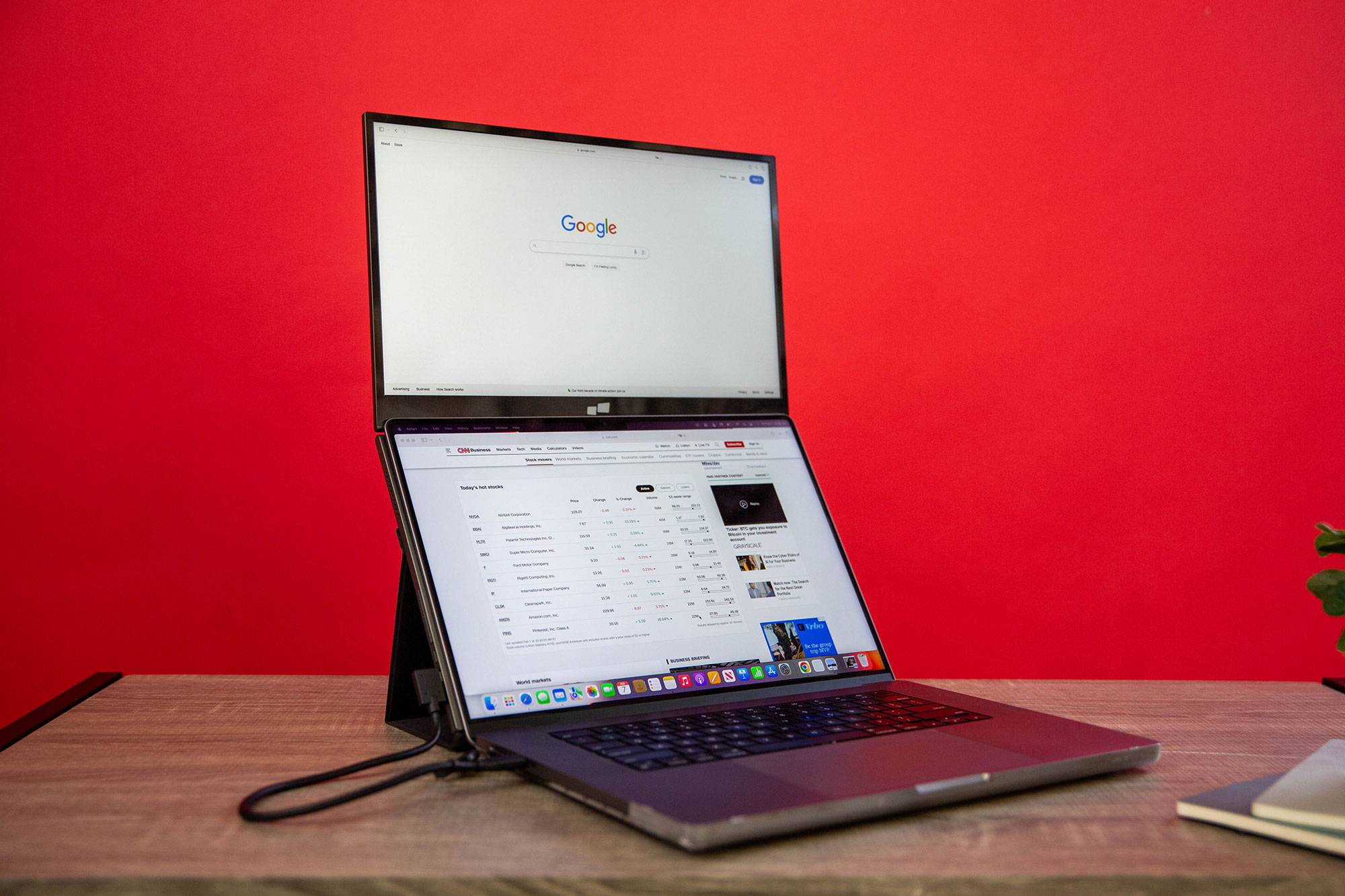
As its name suggests, this lightweight 16-inch QHD display ‘floats’ above your MacBook’s screen via a clever built-in stand that is simple to setup. This Stacked mode doubles your screen space—yet doesn’t feel like a second screen, just an extension. You can keep it physically attached to your laptop with the included magnets but this is an option rather than a necessity.
As well as Stacked (‘floating’) there are two other viewing modes: Free Standing (not floating and separate from your MacBook), and Presentation (the screen is flipped to share content with the person in front of you). The QHD (2.5K) screen sets it apart from many of the HD portable screens reviewed here.
There is a non-Pro version, the Mobile Pixels Duex Float 2, with a slightly smaller 15-6-inch HD screen.
Float 2
- Size: 15.6-inch
- Resolution: 2K (1920×1080 pixels) aka HD
- sRGB Color Gamut: 62%
- Brightness: Up to 300 nits
- Connections: USB-C & Mini HDMI
- Webcam: No
- Stand: Foldable
- Weight: 2.9lb (1.3kg)
- Orientation: Landscape
Read our full
Mobile Pixels Duex Float 2 Pro review
Asus ZenScreen MB249C: Large but portable 24-inch HD screen
Pros
- Large HD screen area
- Sturdy built-in and foldable kickstand
- Offers USB-C for easy single-cable connections
- Good image quality
Cons
- Too large for a backpack
Price When Reviewed:
$349
Best Prices Today:
$322.99

$349

$349

$349.99
- Size: 24-inch
- Resolution: 2K (1920×1080 pixels) aka HD
- sRGB Color Gamut: 100%
- Brightness: Up to 250 nits
- Panel type: IPS LCD
- Connections: USB-C or HDMI to host
- Webcam: No
- Stand: Foldable
- Weight: 6.2lb (2.8kg)
- Orientation: Landscape
Portable monitors are usually associated with travel but, in reality, most never leave the home or office they’re shipped to. Many purchase portable monitors not for their portability but instead their versatility and ease of use—so it can be moved across a home or corporate office. At home, it could let you have two home office setups without having to purchase two monitors, or simply store the monitor out of sight in a cupboard when not in use. In an office, it could be carried to meetings if you need to lead a presentation or study a large spreadsheet. I’ve been on many a call, trying to keep on track on my MacBook as the presenter talks through a complex Excel doc. As large a portable monitor as possible is what you need in those situations—or a wide TV screen.
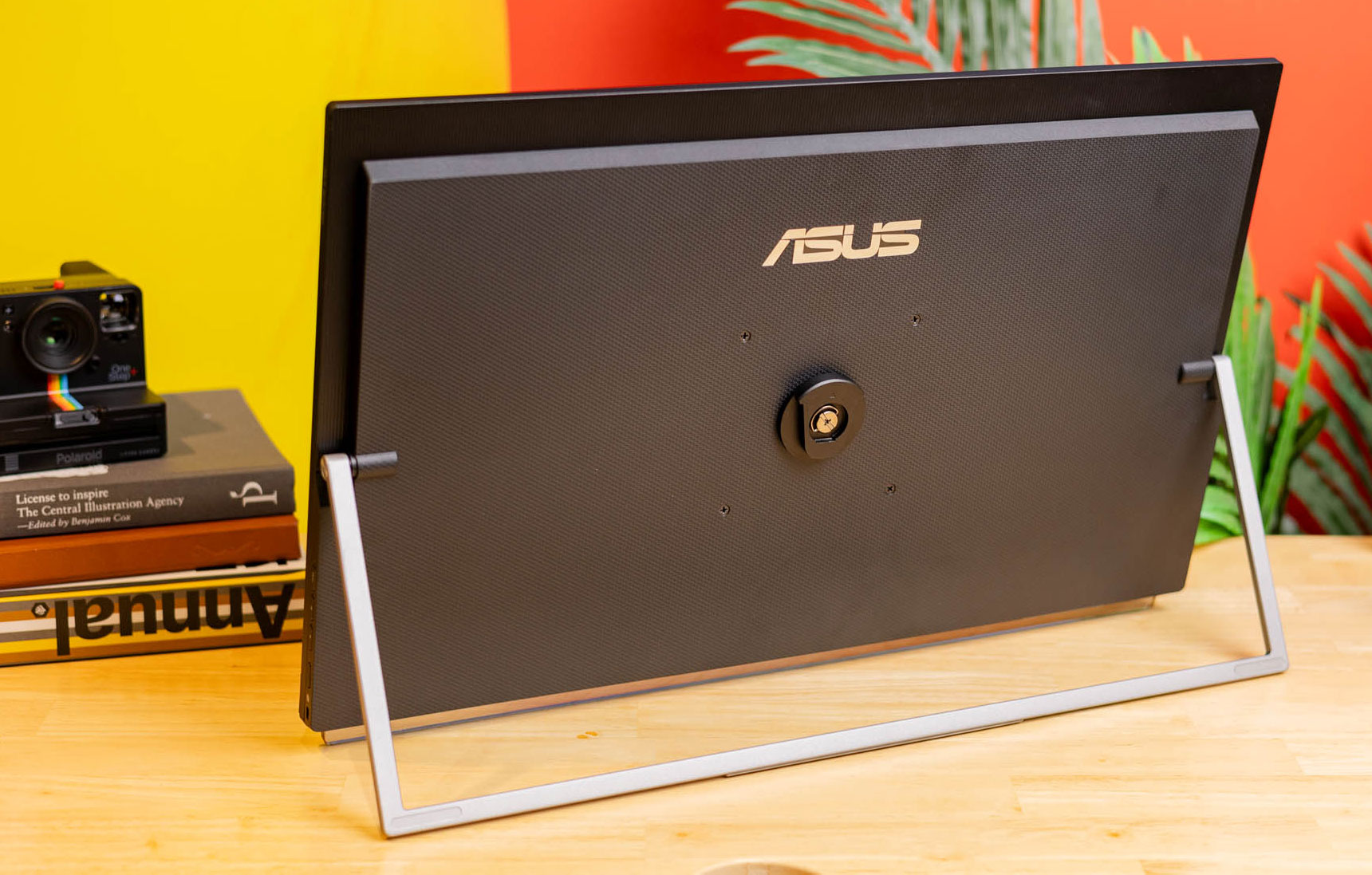
The Asus ZenScreen MB249C pairs a sizable 24-inch screen with several stand options including a kickstand/handle that makes it easy to tote around a house or corporate office. It provides excellent image quality for its intended purpose. It’s bright enough and scores well in contrast, color gamut, and color accuracy, all while avoiding notable problems or pitfalls.
The MB249C is a great choice for a second decent-sized monitor, too, as it offers multiple ways to mount and orient it alongside your primary monitor.–Matthew S. Smith
Read a full Asus ZenScreen MB249C review on PCWorld.
UPerfect Delta Max & Delta Mega: Stacked dual-screen monitors
Pros
- Quality dual HD screens
- Foldable
- Flexible adjustments
- Landscape or Portrait modes
Cons
- Scant instructions
- Delta Max’s touch functions are basic and sporadic
Price When Reviewed:
$649.99
Best Prices Today:

Delta Mega
- Size: 2x 23.8-inch
- Resolution: 2x 2K (1920×1080 pixels) aka HD
- sRGB Color Gamut: 100%
- Brightness: Up to 300 nits
- Panel type: IPS LCD
- Connections: USB-C or HDMI to host
- Webcam: No
- Stand: Foldable
- Weight: 11.2lb (5.1kg)
- Orientation: Landscape or Portrait
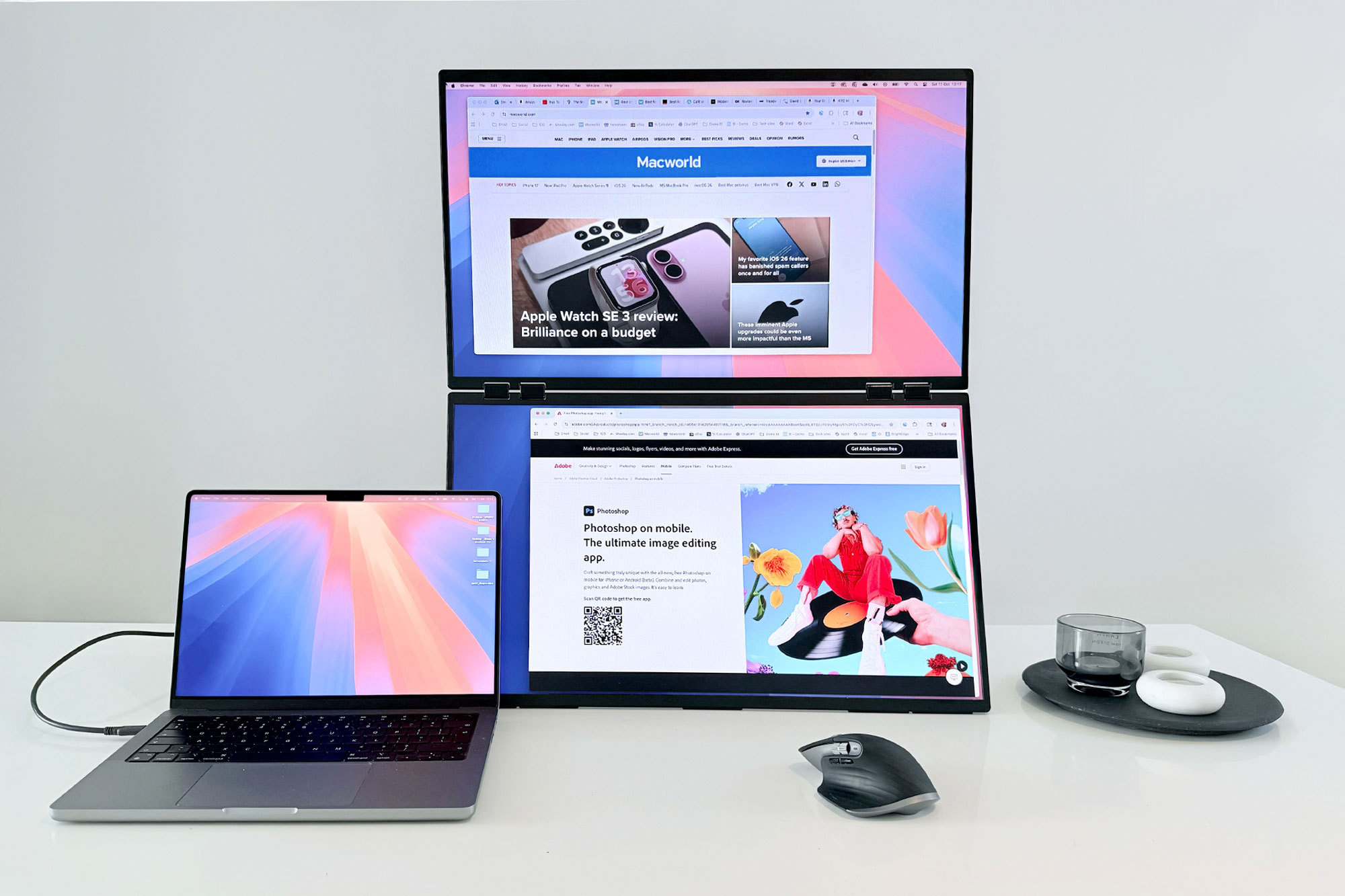
The standard way of adding more than one external display is to have two external monitors side by side, creating a wide extended screen display. A vertically stacked monitor, such as two Delta models from UPerfect—the dual 23.8-inch Delta Mega and dual 18.5-inch Delta Max Touch—can be more ergonomic as the body doesn’t need to frequently turn left and right. The line of sight remains directly in front of the user, reducing frequent rotation of the neck.
Both Delta models with IPS screens look sleek in black aluminum, with a built-in stand folded flush to the outside of the lower screen. You can modify the angle of the stand to adjust the height and angle of the screens to suit your best working posture. The central hinge also allows for flexible adjustment of the two screens to a comfortable and ergonomic angle when used in either a stacked arrangement or folded back on itself to share meeting content with people facing you—say, so you looking at one screen and the clients on the other side of the meeting seeing the other.
These portable monitors are a great solution if you want a good-looking, well-built and super-adjustable portable extended dual screen that connects to your laptop for a more spacious screen experience. The flexibility to bend right back to offer front and back mirrored screens could be the solutions you are looking for in a adaptable dual-screen display.
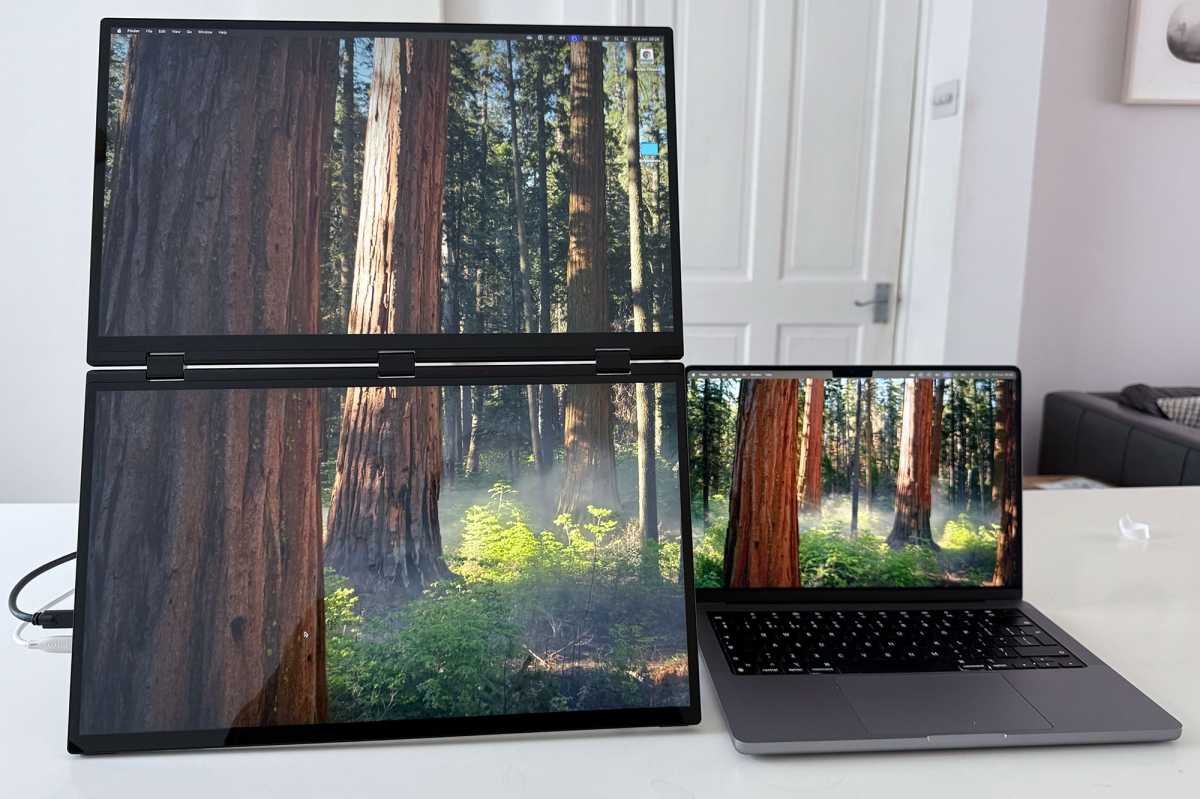
Simon Jary
Delta Max Touch
- Size: 2x 18.5-inch
- Resolution: 2x 2K (1920×1080 pixels) aka HD
- sRGB Color Gamut: 100%
- Brightness: Up to 300 nits
- Connections: USB-C or Mini-HDMI to host
- Webcam: No
- Stand: Foldable
- Weight: 5.2lb (2.4kg)
- Orientation: Landscape or Portrait
The screens of the Delta Max Touch, pictured above, are supposed to feature touch controls and while it’s definitely there the touch functionality is basic at best and awkward in use. Ignore the touch features and this model is a super-portable dual screen. It can also support connections from two computers: one for each screen. Read our full UPerfect Delta Max Touch review.
For our home-working setup we prefer the larger Delta Mega that is a little less portable by size but certainly easily carried short distances. When in use it creates a lot of HD screen space and, like the Delta Max, can easily be folded and stored out of sight when working from home, or commuted to an office or farther afield in a car. If you don’t need all that extra space the regular Delta Max without the average touch controls is a cheaper alternative.–Simon Jary
Read our full
Uperfect Delta Mega Dual Screen Monitor review
MSI Pro MP165 E6 Portable Monitor: Budget portable monitor
Pros
- Includes kickstand, tripod, VESA mounts
- Has two USB-C ports, both with Power Delivery
- Super affordable
Cons
- Modest color performance and accuracy
- Limited menu and image quality options
Price When Reviewed:
$89.99
Best Prices Today:
- Size: 15.6-inch
- Resolution: 2K (1920×1080 pixels) aka HD
- sRGB Color Gamut: 47%
- Brightness: Up to 250 nits
- Panel type: IPS LCD
- Connections: USB-C or HDMI to host
- Webcam: No
- Stand: Kickstand
- Weight: 1.72lb (780g)
- Orientation: Landscape
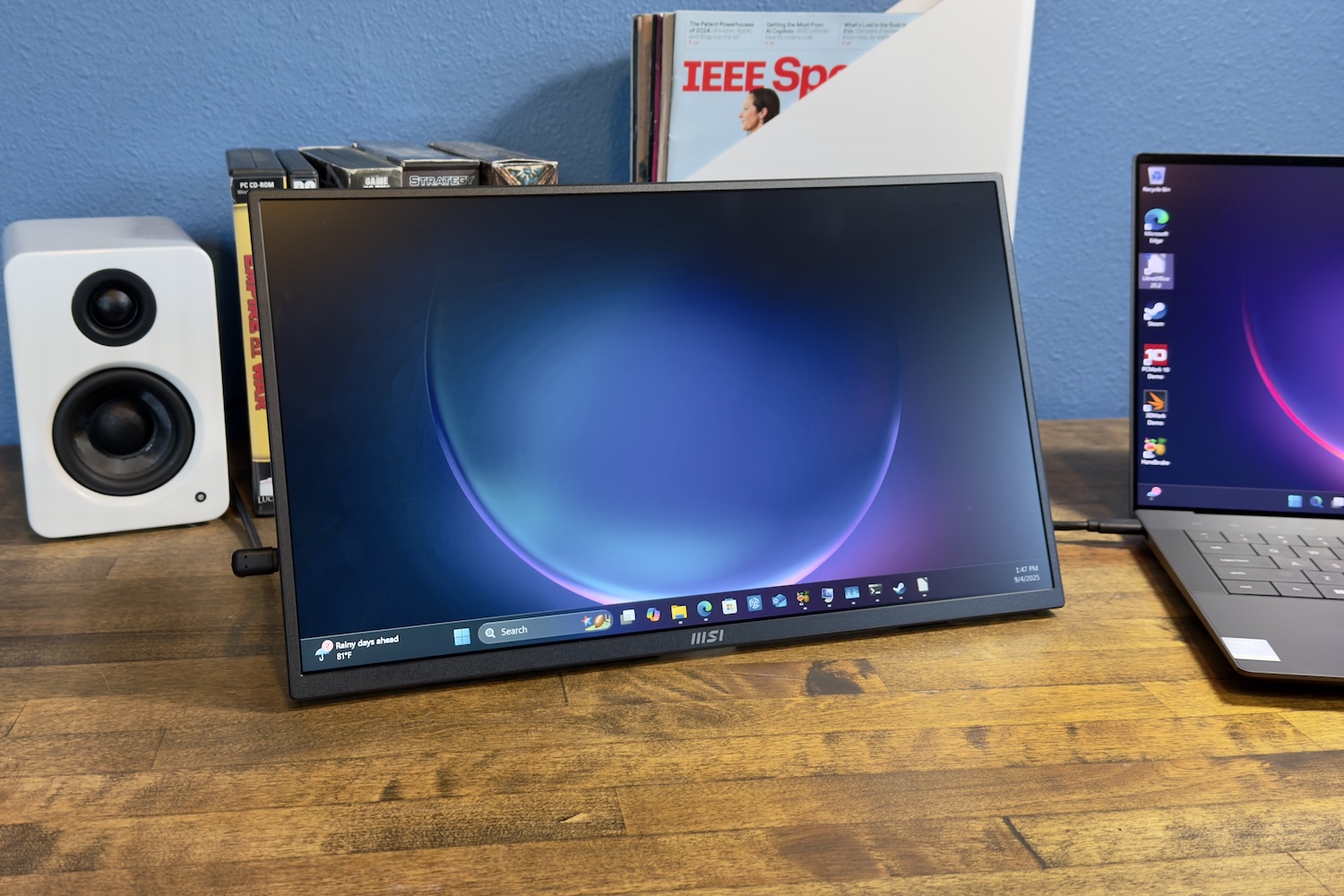
Budget portable monitors are a dime a dozen, and to be frank, many are interchangeable. That’s because most use the same IPS-LCD display panel technology, offer the same or similar ports, and are similar in size. The MSI Pro MP165 E6 also follows these trends but stands out with kickstand, 1/4-inch tripod and 75x75mm VESA mount options.
The MSI Pro MP165 E6 is a versatile option for shoppers who need a budget portable monitor that can be used with a VESA wall mount, a conventional monitor arm, or even a tripod.
Color gamut is where the MSI Pro MP165 E6 falls towards the bottom of the budget competition. It has a very limited color gamut that covers just 63 percent of sRGB and 47 percent of both DCI-P3 and AdobeRGB—compare that with the UPerfect Delta Max’s 100% or Delta Mega’s 97%. This is not a monitor for professional photo or video editing but, rather, a budget portable monitor for office productivity, digital signage, collaboration, and other tasks where color performance is less of a concern.–Matthew S. Smith
Read a full MSI Pro MP165 E6 review on PCWorld.
Mobile Pixels Trio 3 Pro: Screen extender for portability
Pros
- Adds two 14-inch screens
- Portable
- High QHD resolution
- Easy setup
Cons
- Requires software installation
Price When Reviewed:
$499.99
Best Prices Today:
$429.99
$429.99

$441.99
$499.99
- Size: 2x 14-inch
- Resolution: 2K (1920×1080 pixels) aka HD
- sRGB Color Gamut: 100%
- Color Gamut NTSC: 72%
- Brightness: Up to 300 nits
- Connections: USB-C to host
- Webcam: No
- Stand: Connected
- Weight: 4.13lb (1.9kg)
- Orientation: Landscape or Portrait
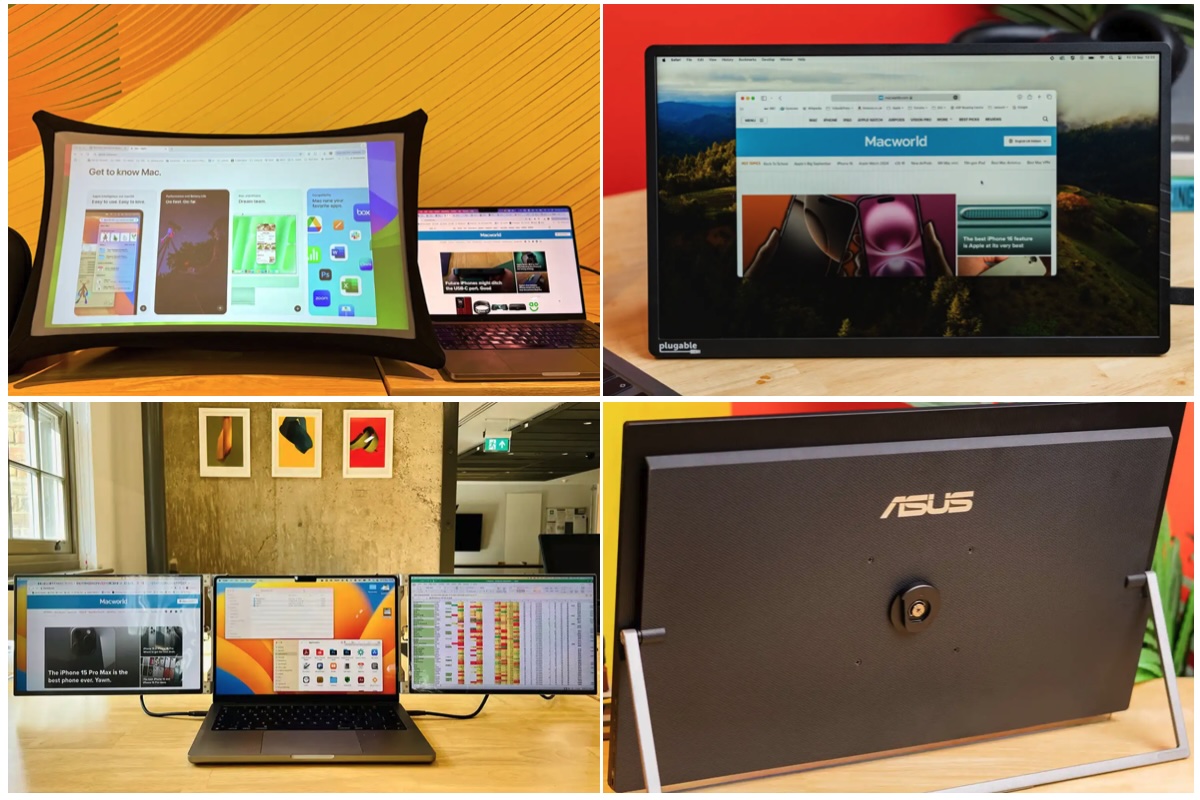
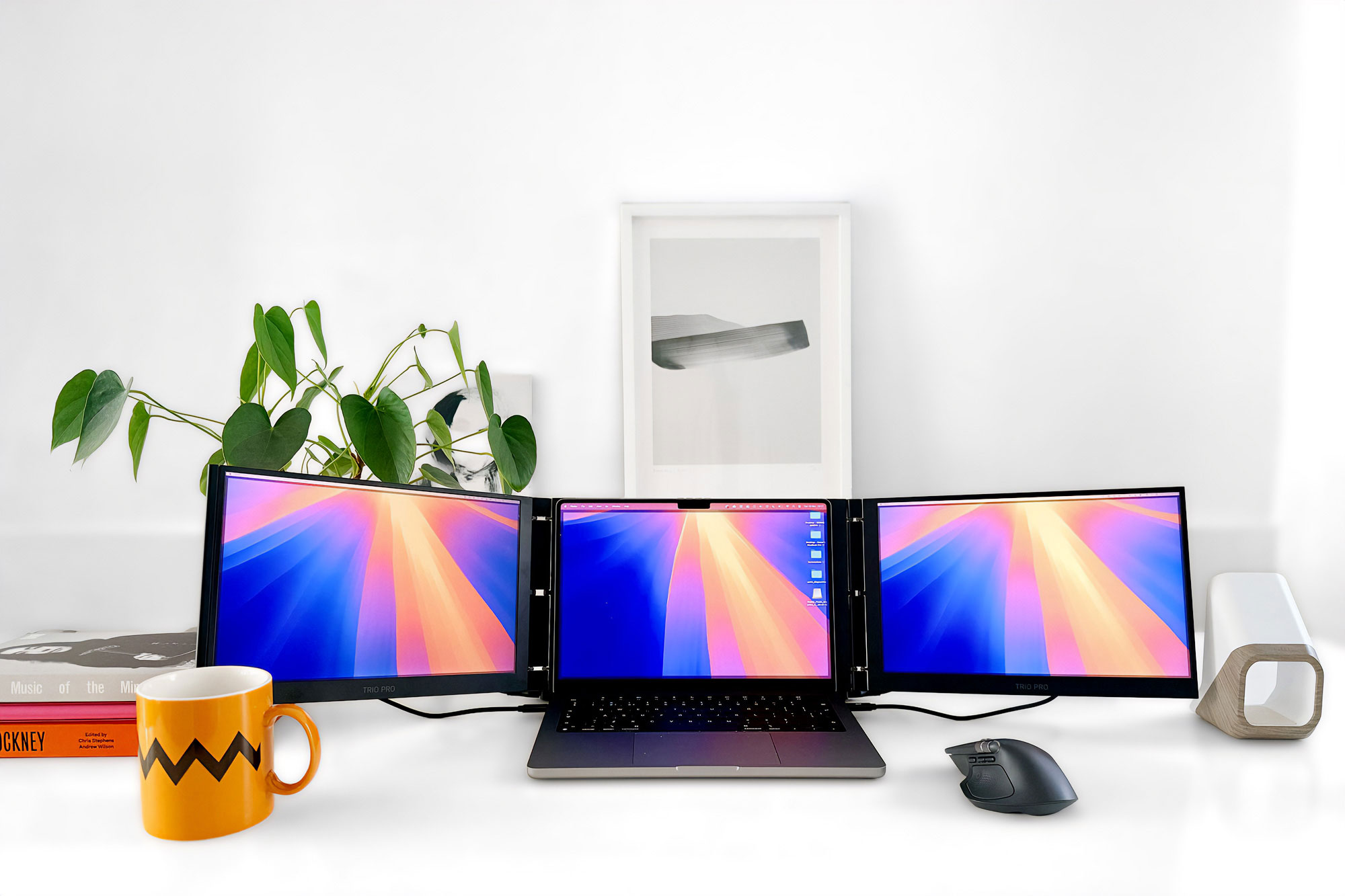
The Mobile Pixels Trio 3 Pro is a screen extender that your MacBook slots into and adds a 14-inch screen either side of the laptop’s own. It is compatible with 13-16-inch MacBooks, and connects via USB-C cables (included).
When folded up, the Trio 3 Pro measures 13.4 x 8.8 x 0.9 inches (34 x 22.4 x 2.3cm). In all its unfurled glory, it spans 40.3 inches (just over 1m) but can be pulled closer together if your available desk space doesn’t stretch that far.
It’s a design that will either excite you with its screen breadth or scare you with its wingspan. It looks cumbersome but is actually quite light and flexible. The Trio 3 Pro’s protective and subtly magnetic folio cover doubles up as an integrated stand that is reasonably firm.
Note that plain (non-Pro/Max) M1 and M2 Macs plus the new MacBook Neo are limited to connecting just a single monitor. To work with the Trio 3 Pro users of those Macs will need to download and install free software (rather like DisplayLink).
It’s QHD rather than 4K and so is not as sharp and clear as the MacBook’s own. But it’s fine for spreadsheets, browsers and other mainstream applications. It’s great for adding supplementary screen estate when you’re on a video call, or for presentations.
At $499, it isn’t cheap, but you are paying for portability and two decent screens. If what you need is a more lightweight and flexible solution that’s perfect for video conferencing, presentations or multiple application work, the Trio 3 Pro is a striking solution with some clever customizations.
–Simon Jary
Read our full
Mobile Pixels Trio 3 Pro review
Arovia Splay: Ultra-portable, foldable monitor and projector
Pros
- Foldable display
- Converts into projector
- Power bank function
Price When Reviewed:
$1,299.99
Best Prices Today:

$1581.99
Size: 24.5-inch
Resolution: 2K (1920×1080 pixels) aka HD
Brightness: Up to 760 nits
Connections: HDMI to host
Webcam: No
Stand: Foldable
Weight: 2.5lb (1.5kg)
Orientation: Landscape
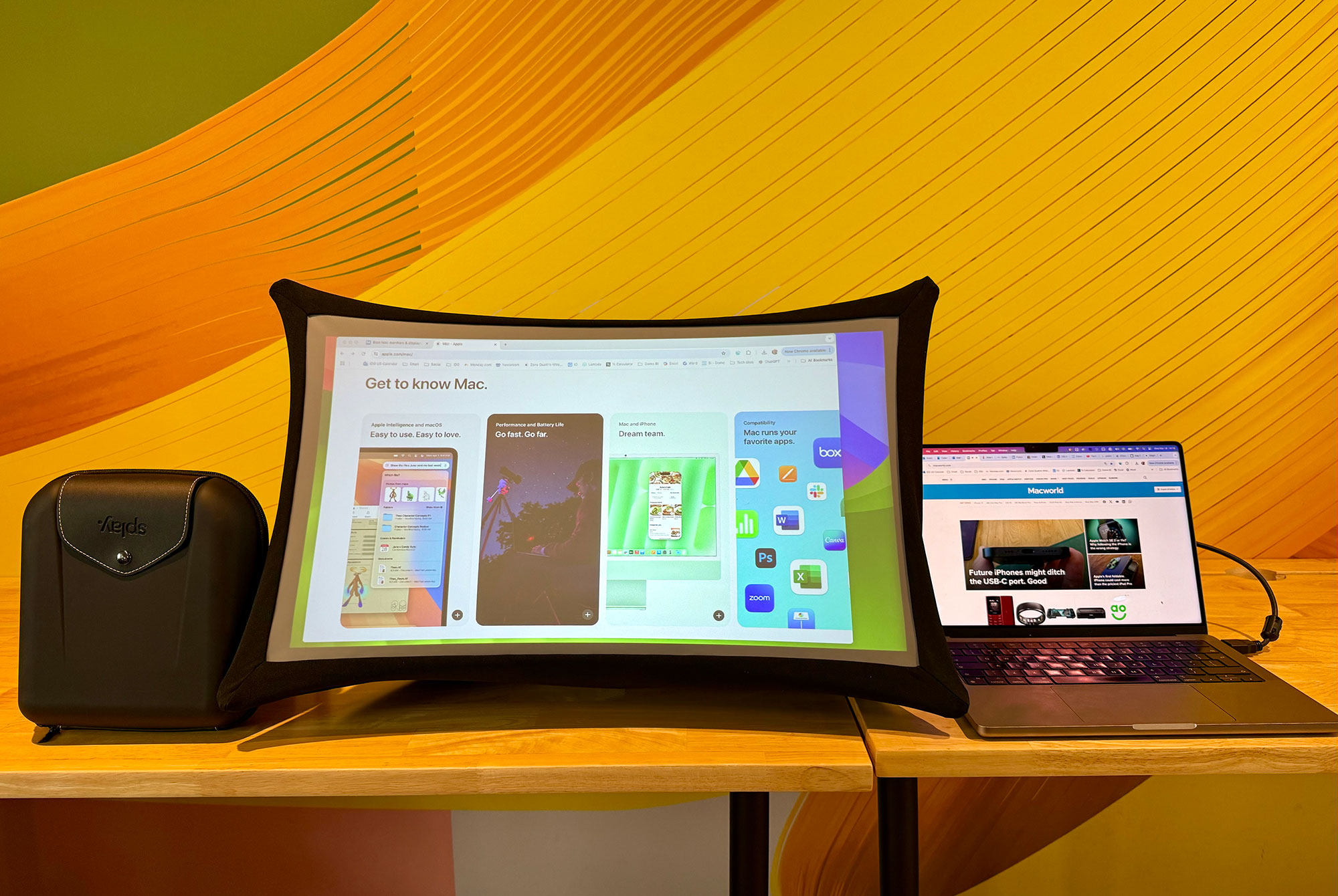
This clever display is actually an LED Pico projector that can transform into a fold-out 24.5-inch monitor via a collapsible shroud that surrounds the projector as it projects the image from your computer via the HDMI connection. The price is high but this portable all-environment, 2-in-1 screen might solve your display needs away from a standard desk setup.
Setup is easy and there’s a useful video available for teaching you all its tricks. When collapsed the whole thing fits into a small box a bit larger than an iPad mini or over-ear headphones case (see our photo above), albeit quite a fat one, at 9.5 x 9.5 x 3.5 inches. It weighs 2.5lbs (1.1kg), so combined with the foldability it’s more portable than traditional fixed and firmer monitors.
The 24.5-inch screen displays a native 1920 x 1080 resolution in a 16:9 aspect ratio, with a max brightness of 760 nits in display mode.
While the nanomaterial screen is flexible, it is taut and wrinkle-free. You adjust focus and brightness via controls on the top of the projector body. Comapred to a standard hard monitor it’s not as great for reading a lot of small text on the screen but its target function for viewing from distance.
The Splay is marketed at on-the-road presentations and trade shows, videos, but it would work as well for showing videos at home or on a camping trip when a laptop just isn’t large enough. The 44Wh battery should keep the screen bright for up to four hours and handily can triple-up as a power bank to top up your phone or laptop via USB-C. It has stereo speakers built-in, with volume controls on the projector.
Author: Simon Jary, Contributor, Macworld

Simon has over 30 years of expert experience testing and reviewing ever-smaller and more powerful tech accessories, from USB-C and Thunderbolt docks to chargers, batteries, hubs and adapters. A former Editor of Macworld, he has contributed to PCWorld, Tech Advisor and TimeOut, as well as national newspapers such as The Times, Independent and Telegraph.
