


Amazon is finally making viable color e-readers.
By

Samantha Mangino
Lead Shopping Reporter
Samantha Mangino, is an e-reader expert. She’s tested all the Kindle and Kobo e-readers, diving into the buzziest models. Her love of reading extends beyond the e-reader beat, covering books and authors, too. In the tech space, she covers tablets, smart rings, and headphones.
on
All products featured here are independently selected by our editors and writers. If you buy something through links on our site, Mashable may earn an affiliate commission.

Credit: Bethany Allard / Mashable
Color has finally come to e-readers, opening up a richer digital reading experience for anyone who uses Libby for graphic novels, prefers color EPUBs, or simply enjoys seeing a book’s cover in full color. But with more devices offering the feature, which one stands out? For us, the Kobo Libra Colour is the clear winner.
Overview

These are the tech, tools, and products — from laptops to e-readers, from earbuds to robovacs, and more — that Mashable ranks best in class.
Table of Contents
When we write about e-readers, Kindle is usually the first name that comes to mind. But in the color e-reader market, Kindle has been late to the party. That delay opened the door for other brands to step in with stronger devices. We’ve rounded up the best color e-readers, and here are the ones that stood out.
Color e-reader price increases
This year has not been good for tech prices. Due to the global memory crisis, prices are increasing on tablets, phones, laptops, and even e-readers. Three out of the four color e-readers on this list increased in price this year. The only e-reader to avoid a price hike was the Kindle Scribe Colorsoft.
The best tech deal this week
Temper your color expectations

An e-reader’s color won’t be quite as vibrant as a tablet’s or physical book’s.
Credit: Samantha Mangino / Mangino
Having tested my way through a lot of e-readers — and now color e-readers — I’ve found a universal truth: While the colors are accurate, they often look a bit washed out. No matter which brand you use, that’s going to be the case. The muted tones don’t outweigh the convenience and portability of color e-readers, but it’s worth tempering your expectations.
Don’t expect the vivid, punchy colors of an iPad screen. An iPad has a max of 500 nits (a measure of brightness), while Kobo and Kindle e-readers max out at 100.
Our Pick

The Good & The Bad
-
The perfect size for being portable without being too small
-
Buttons are excellent for turning the pages
-
Generally well-designed
-
Color (especially highlights) shows up clearly
-
OverDrive integration is seamless and beats Kindle’s options
- Pocket integration is great for folks who love to read articles
-
Palm rejection could use some work
-
Kobo’s online store isn’t as expansive (or affordable) as Amazon’s
-
The occasional ghosting issues
-
Notebook mode could use some work
- Battery life could be better
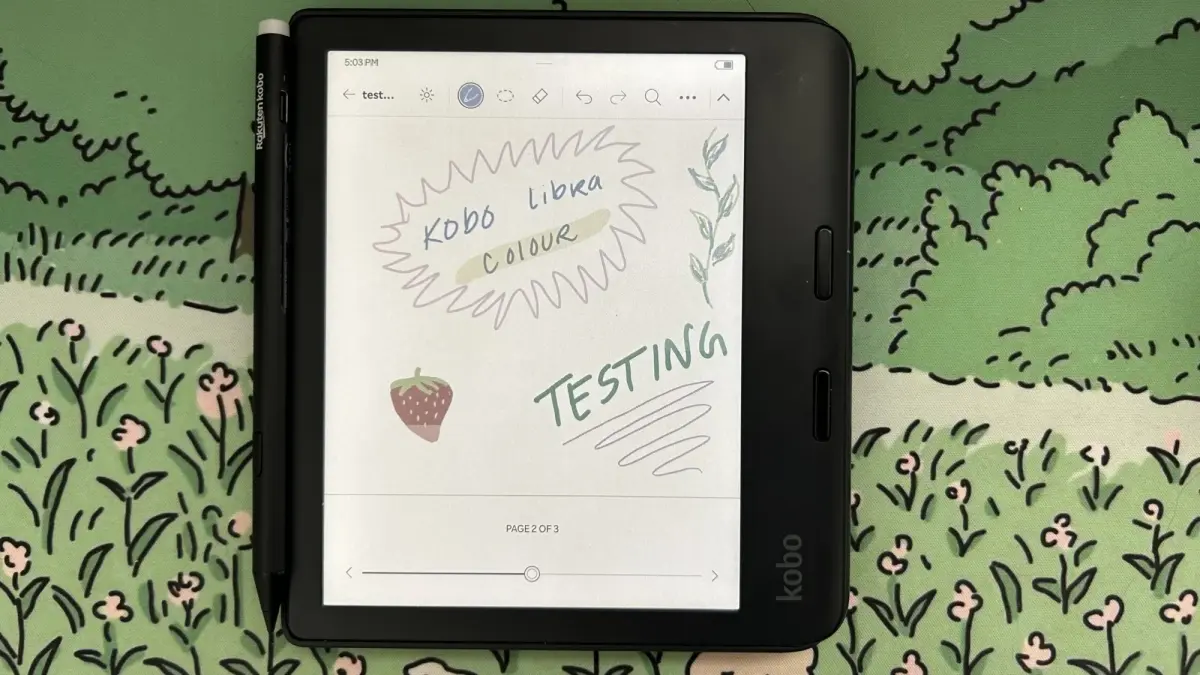
Expert-approved: Besides the Kindle Paperwhite, the most popular e-reader among the Mashable team is the Kobo Libra Colour. Its seven-inch display offers ample space for reading graphic novels in detail, and the built-in gyroscope lets you switch between vertical and horizontal reading — a flexibility unique to the Libra. Not to mention it has the most sought-after feature for e-reader users: page-turning buttons.
As with all color e-readers, colors appear more muted than in a physical book. That’s unavoidable, but the Libra maintains strong color accuracy despite the softer tones.
Like many e-readers, the price on the Kobo Libra Colour increased, but even at $259.99, it’s still cheaper than any of Kindle’s color e-readers. While Kobo does offer a more budget-friendly color option with the Clara, the Libra is worth the extra cost for its writing features, internal gyroscope, and page-turn buttons. It has plenty of storage (32GB) and is waterproof.
If you were disappointed by the discontinuation of the Kindle Oasis, the Kobo Libra Colour offers a similar design, including page-turn buttons. Ergonomically, it’s the best e-reader I’ve tested. It’s more square than a Kindle, as one side offers extra space for the page-turning buttons, which makes it easier to hold — especially while lying down and reading one-handed. It’s the only e-reader (besides the iPad) on this list that has an internal gyroscope, so when you rotate the device, the display rotates with it. While reading in bed, if I flipped over, I could rotate the device to still be able to hold it on the side with page-turning buttons.
Finally, the Overdrive (aka Libby) integration is great. Log in with your library card, and your borrowed e-books instantly populate in the Overdrive tab.
Details

The Good & The Bad
-
Matte, glare-free display
-
Perfect screen size
-
Adjusts page count based on font
-
Color display
-
Waterproof
- Ad-free
-
No page-turning buttons
-
Can’t log in to multiple library accounts at once
- No Amazon integration (though that may be a pro)
Like the Libra Colour, the Clara Colour has generally accurate colors, though in muted tones. With a 6-inch screen, it might feel a bit small for graphic novels, which is why we think the Libra is the better color e-reader.
In the grand scheme of color e-readers, the Clara is the most affordable. At $179.99, it’s $20 cheaper than the Kindle Paperwhite and only $30 more than a basic Kindle. If you want a Kindle in color, you’ll have to pay $289.99.
Its processing system is really smart and fixes one of my biggest e-reader pet peeves. When you adjust the font size on a Kindle, the device doesn’t recalculate how many pages are in the book, which makes it inaccurate — you never really know how many pages are left in a chapter. The Kobo Clara does recalculate page count accurately, giving you a more exact reading experience. Also, like the Libra, it has seamless OverDrive integration.
The Kobo Clara’s biggest downfall is its battery life. It’s supposed to last up to 42 days, although many users say it averages out at about two weeks. That’s pretty weak compared to the Kindle’s 12-week battery life; however, I’d trade a couple of weeks of battery life for a better reading experience any day.
Details

The Good & The Bad
-
Great battery life
-
Zoom feature works well
-
Ad-free homescreen
- Nice aluminum casing
-
Some color flashing
- Expensive — try to buy it on sale
Unfortunately, E Ink technology has extremely dim and muted colors. Even if you crank the vibrancy settings all the way to the max, the colors are disappointing. When you compare the Kindle Colorsoft side-by-side with graphic novels or books with illustrations, the differences are extremely obvious. If you want to read comics or similar color artwork digitally, you’re better off with a tablet.
With those major caveats, if you want a Kindle with color, this is the best option. On the plus side, we love the fig colorway (it matches the burgundy iPhone), and the color lockscreen artwork does look great.
Details

The Good & The Bad
-
Exceptional e-reader and note-taker
-
Fast processing
-
No lag time
-
Easy-to-navigate interface
- Fantastic notebook organization
-
Colors somewhat muted
-
Low color resolution
- Expensive
Where the Kindle Scribe Colorsoft really stands out is its lack of ghosting. Many e-readers with writing capabilities suffer from previous screens or images appearing as shadows when you erase or navigate away. Yet, that’s not an issue with this latest Scribe. It isn’t completely innocent; it still has some ghosting, specifically when erasing writing or drawings, but it’s very faint.
It’s delightful to write and draw with, allowing you to swap between several different pen styles. It comes with the Kindle Premium Pen, a lightweight stylus that magnetically attaches to the side of the e-reader when not in use. The colors on the Scribe Colorsoft are limited, a pastel-leaning palette that works well within the parameters of the Scribe’s limited resolution and brightness.
It’s as fast as any Kindle, living up to the speed of the beloved Paperwhite. It has impressive battery life too, lasting up to eight weeks, although that may be shortened by how often you use the writing feature.
Details
New to this guide:
-
As of October 2026, we added the new Kindle Colorsoft Signature Edition to this list. While the display and resolution haven’t improved, its new aluminum casing makes it a sturdier e-reader.
-
In February 2026, we added the Kindle Scribe Colorsoft to this guide. After testing Amazon’s latest e-reader, we were thoroughly impressed by both its speed and display.
You might notice that ReMarkable e-ink tablets are not on this list. We’ve tested both the ReMarkable Paper Pro and ReMarkable Paper Move, and while they’re dynamic digital notebooks, they’re limited in their e-reader capabilities. Getting e-books on these devices was a bit of a struggle, and we missed the Libby integrations available on Kindles and Kobos. So while we think they’re great e-ink tablets, they’re inferior e-readers.
To test the best color e-readers, I used the same criteria I apply to standard e-readers, with one key addition: color quality, the main draw of these devices.
Screen size is especially important for color e-readers, since many people use them for graphic novels. I gave preference to 7-inch screens, the optimal size for balancing viewing and portability.
To properly assess each e-reader’s color quality, I compared its display with both a physical copy of the book and the e-book on an iPad. I looked at overall color accuracy, as well as how brightness and warmth affected the color levels.
I analyzed each color e-reader’s range of features, including adjustable brightness and warmth, as well as page-turn buttons.
Color e-readers vary widely in price, so I made sure to include a budget option in an otherwise expensive market.

